 BASIC CONFIGURATION - PART 2 - WPN SETTINGS
From the main menu, choose Options, then WPN. This box will appear:
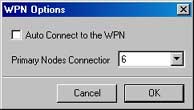
If you tick Auto Connect To The WPN the server will connect automatically every time you start a room. Note that you cannot connect until you have a room running.
In most cases you dont have to change the default amount of Primary Nodes, but using fewer Primary Nodes will affect the bandwidth usage. Normally, it will also reduce the chance of getting the room listed so that it will appear to all users around the globe. Connecting to 8 primary nodes will use about 4-7kb/s incoming and 0.5-2kb/s outgoing bandwidth at normal operation.