 BASIC CONFIGURATION - PART 1
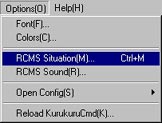
You can adjust basic settings without writing a single command. From the menu, select RCMS-situation as shown below.
The settings will always tell you if a feature is enabled or not. To change the settings in the top-part, tick/untick its checkbox and hit OK. Settings will take effect instantly.
Note that you should save your settings. Settings in the upper part will be saved to ChatStartup.txt and needs manual saving. Settings in the lower part will be saved automatically in Server.ini when you click OK
By clicking Back you will exit the settings.
Note that if you have added additional entries to the ChatStartup.txt by yourself, saving will overwrite, and be lost.

UPPER PART
ID Numbers: Enabled, nicknames will display as <NickName> in channel (note: Half Numbers must be disabled) more...
ID Half Numbers: Enabled, nicknames will display as <NickName000> in room more...
#UserCmd: Enabled, users with level 3 can use additional commands. See ... for spesific details more...
Command Concealement: Enabled, it prevents the actual command used from showing up in room more...
#Hasleft Block: Enabled, users and moderators trying to use the #hasleft-command will be autokicked from room more...
Newline Block: Enabled, users and moderators trying to use #\r\n# will be autokicked from the room more...
Name Change Notification: Enabled, a notice will be displayed if a user changes nickname more...
Rename Block: Enabled, it will autokick a user if the user changes nickname rapidly more...
#Comd Limitation: Enabled, this will prevent Users and Moderators from using Special/limited commands as #hasleft, #\r\n# #private #message, and others more...
Text Format: Enabled, nicknames and text will be formatted more...
Watching The Ignored User: Enabled, only Admins and above will be able to see what a muted/ignored user writes more...
Suneo Block: Floodblock. Enabled, users who write messages rapidly in room will be autokicked from the room more...
Penalty: Enabled, a penalty will become effective when a user leaves the room. The user will not be able to enter the room before the timer reaches zero more...
Leecher Block: Enabled, users sharing fewer files than the limit, is blocked from enetring the room more...
User Name Blocking: more...
MXArms Block: Enabled, it prevents mass-redirects from other rooms more...
Illegal Client Block: Prevents illegal clients from entering room more...
Text Replace: Enabled, the server will replace certain words more...
Automatic Lurker Block: Enabled, users being inactive for a defined amount of time will be autokicked from the room more...
Welcome Message: Enabled, the welcome message will show every time a user enters the room more...
Message Block: Enabled, the server will disregard messages containing specified words more...
LOWER PART
Share Block Num: Number of files a user must share for entering the room more...
Max Connections: The amount of users from same IP-address allowed in room more...
ROM Block Time: The amount of time before user gets autokicked from room. Will only work if Automatic Lurker Block is enabled more...
Default User Level: The initial level when user enters room more...
Redirect To: The name of the default redirectroom. Name must include full name with numbers more...
Welcome Message: The default welcome message displayed when a user entering room more...
Topic: The topic of the room more...
Motd: Message Of The Day. Will display to every user entering the room more...
CoHost's Passcode: Password for gaining level 6-status more...
Admins Passcode: Password for gaining level 5-status more...
Moderators Passcode: Password for gaining level 4-status. more...